In 2025 I started adding more and more things to Home Assistant, starting with my Daikin A/C and temperature/humidity sensors. One of the thing I wanted was to manage my audio system.
Over the years I have tried multiple things, including using a raspberry pi with a recreated Pi Music Box implementation based on docker. I eventually settled for using said raspberry pi as a headless Spotify player connected to my Hifi. This meant that my only source of audio was Spotify, which to be fair kind of worked but limited my choices. I also had a DVD-CD player connected to my amplifier and my whole collection of CD ripped in FLAC format, but I rarely used the first option and didn’t have the second one accessible to be played.
Last Christmas though, my wife offered me a turntable so I could play the collection of Vinyls that I inherited from my sister and sat sadly untouched for over 10 years.
This was a trigger for me to finally revisit this setup: I configured Music Assistant to have access to my collection of FLAC files as well as Spotify, so I could easily play them. One thing that annoyed me though was that my Marantz amplifier (a PM6004) needed to be “woken up” using a remote and I wondered if there was a way to get this interfaced with Home Assistant as well.
The Marantz amplifier
At first I thought about using an IR blaster to replace the Marantz remote, but through an Hackaday article I came across Alex Samorukov’s project. In his project, he used an esp32 with arduino to create a web-based “remote” connected to his Marantz amplifier over a cable with an RCA connector. He even posted his code in a github repository, where he provided information about the 1N5408 diode he used in his setup.
So I had all the information I needed to give it a go. I cannibalised an audio cable with RCA connector I had lying around, bought a 1N5408 at my local Jaycar and “ported” his code to run on one of the esp32 S2 mini I already had. I managed to compile and install it from the Arduino IDE, and it worked!
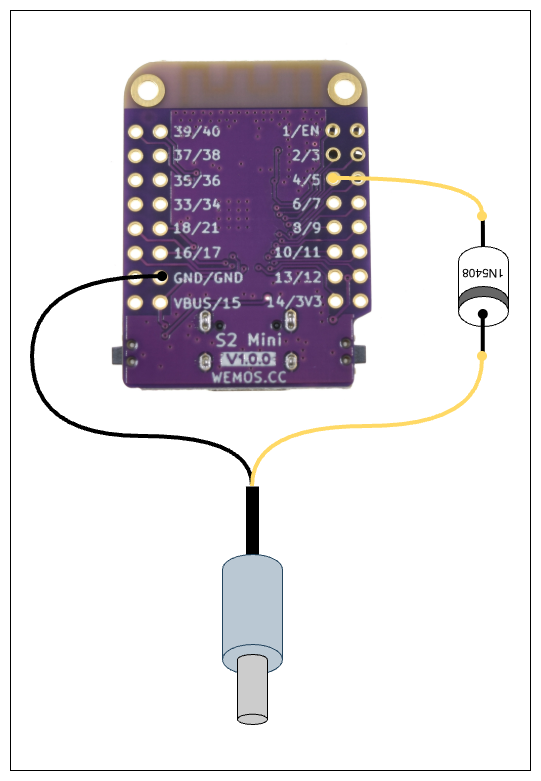
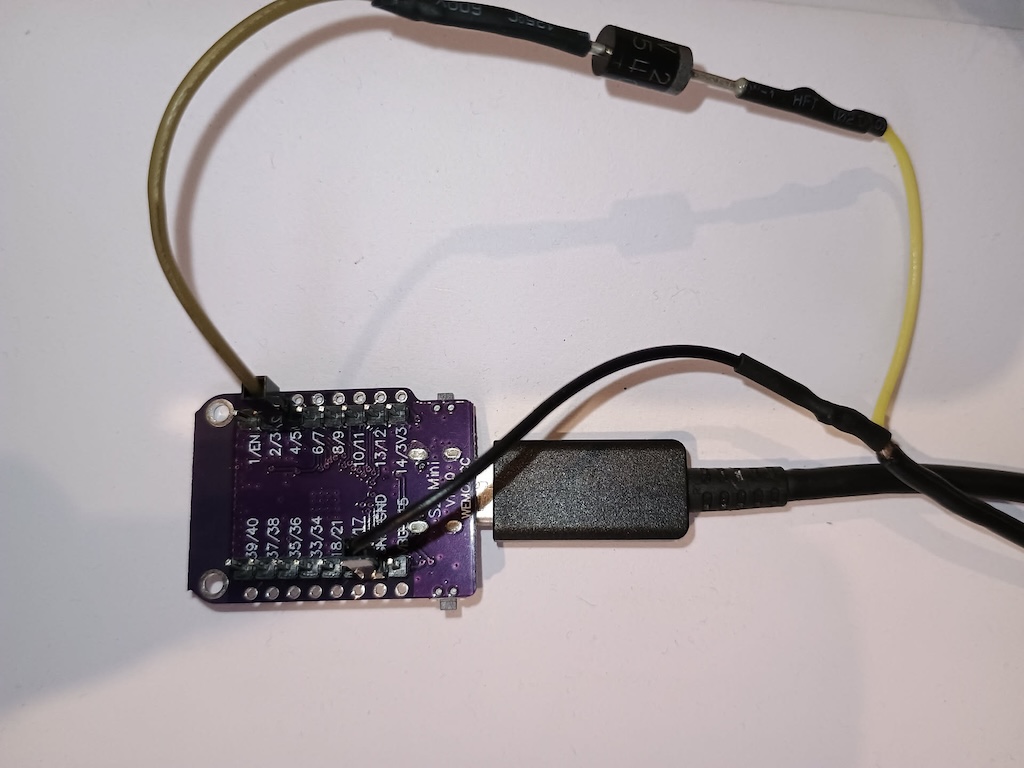
I initially wanted to keep the web interface and add ESPHOME integration or MQTT integration. But more searches led me to this other Hackaday project that used ESPHOME for a similar purpose and I decided to drop the Web UI to only use the ESPHOME Home Assistant integration.
Marantz Custom RC5 aka RC5X
While Alex project had support for the main features I wanted (standby, source selection and volume up/down), I wanted to see if I could support more features from my remote.
Various internet search returned spreadsheets with remote codes for Marantz:
- marantz_fy20_sr_nr_ir_code_v03_20190827182355425.xls
- marantz_fy20_sr_nr_protocol_v03_20190827182350130.xls
- marantz-2014-ir-command-sheet.xls
I used those and the buttons on my Marantz remote to figure out what I wanted to emulate:
- Standby
- Volume Up/Down
- Phono
- CD
- Tuner
- Aux1
- Input Next/Back
- Source Direct
- Loudness
- Speaker Selection
- Mute
Unfortunately my amplifier does not have motorized Bass/Treble/Balance nor direct volume setting so those are out of reach.
Getting the basic RC5 commands to work on esphome was very straight forward, but Marantz is using this special flavour of RC5 described in Alex’s blog that is not supported by ESPHOME out of the box. So the work-around is to calculate the raw code equivalent in Manchester Code and then use remote_transmitter.transmit_raw.
I found that process quite frustrating, but like for others in the various blog posts, the information from this blog post by Adrian DeLeon on Lirc ML allowed me to crack it with a bit of patience.
I used both RC5 and RC5X codes to calculate raw code and verify that I had the expected results:
# volume up
RC5 Device/Adress 16 (0x10), Command 16 (0x10)
code: [+888, -888, +888, -888, +888, -888, +1776, -888, +888, -888, +888, -888, +888, -888, +888, -1776, +1776, -888, +888, -888, +888, -888, +888]

# volume down
RC5 Device/Adress 16 (0x10), Command 17 (0x11)
code: [+889, -889, +889, -889, +889, -889, +1778, -889, +889, -889, +889, -889, +889, -889, +889, -1778, +1778, -889, +889, -889, +889, -1778, +889]

# Aux1
RC5x Device/Adress 16 (0x10), Command 0 (0x0), Extension 6 (0x6)
code: [889, -889, 889, -889, 889, -889, 1778, -889, 889, -889, 889, -889, 889, -4450, 889, -889, 889, -889, 889, -889, 889, -889, 889, -889, 889, -889, 889, -889, 889, -889, 889, -1778, 889, -889, 1778]

# Input Next
RC5x Device/Adress 16 (0x10), Command 0 (0x0), Extension 13 (0xD)
code: [889, -889, 889, -889, 889, -889, 1778, -889, 889, -889, 889, -889, 889, -4450, 889, -889, 889, -889, 889, -889, 889, -889, 889, -889, 889, -889, 889, -889, 889, -1778, 889, -889, 1778, -1778, 889]

# Input Back
RC5x Device/Adress 16 (0x10), Command 0 (0x0), Extension 14 (0xE)
code: [889, -889, 889, -889, 889, -889, 1778, -889, 889, -889, 889, -889, 889, -4450, 889, -889, 889, -889, 889, -889, 889, -889, 889, -889, 889, -889, 889, -889, 889, -1778, 889, -889, 889, -889, 1778]
With those I managed to have a fully working ESPHOME-based Marantz remote for my PM6004:
marantz-remote.yaml
esphome:
  name: marantz-remote
  friendly_name: marantz-remote

esp32:
  board: esp32-s2-saola-1
  framework:
    type: esp-idf

# Enable logging
logger:

# Enable Home Assistant API
api:
  encryption:
    key: !marantz_api_key

ota:
  - platform: esphome
    password: !marantz_ota_password

wifi:
  ssid: !secret wifi_ssid
  password: !secret wifi_password

  # Enable fallback hotspot (captive portal) in case wifi connection fails
  ap:
    ssid: "Marantz-Remote Fallback Hotspot"
    password: !marantz_hotspot_password

captive_portal:

remote_transmitter:
  pin: GPIO4
  carrier_duty_percent: 100%
  non_blocking: 'false'

button:
  - platform: template
    name: "Volume Up"
    icon: "mdi:volume-plus"
    # RC5 Device/Adress 16 (0x10), Command 16 (0x10)
    on_press:
      remote_transmitter.transmit_rc5:
        address: 0x10
        command: 0x10
  - platform: template
    name: "Volume Down"
    icon: "mdi:volume-minus"
    # RC5 Device/Adress 16 (0x10), Command 17 (0x11)
    on_press:
      remote_transmitter.transmit_rc5:
        address: 0x10
        command: 0x11
  - platform: template
    name: "Standby"
    icon: "mdi:power"
    # RC5 Device/Adress 16 (0x10), Command 12 (0x0C)
    on_press:
      remote_transmitter.transmit_rc5:
        address: 0x10
        command: 0x0C
  - platform: template
    name: "Phono"
    icon: "mdi:record-player"
    # RC5 Device/Adress 21 (0x15), Command 63 (0x3F)
    on_press:
      remote_transmitter.transmit_rc5:
        address: 0x15
        command: 0x3F
  - platform: template
    name: "CD"
    icon: "mdi:disc-player"
    # RC5 Device/Adress 20 (0x14), Command 63 (0x3F)
    on_press:
      remote_transmitter.transmit_rc5:
        address: 0x14
        command: 0x3F
  - platform: template
    name: "Tuner"
    icon: "mdi:radio"
    # RC5 Device/Adress 17 (0x11), Command 63 (0x3F)
    on_press:
      remote_transmitter.transmit_rc5:
        address: 0x11
        command: 0x3F
  - platform: template
    name: "Aux1"
    icon: "mdi:location-enter"
    # RC5x Device/Adress 16 (0x10), Command 0 (0x0), Extension 6 (0x6)
    on_press:
      remote_transmitter.transmit_raw:
        code: [889, -889, 889, -889, 889, -889, 1778, -889, 889, -889, 889, -889, 889, -4450, 889, -889, 889, -889, 889, -889, 889, -889, 889, -889, 889, -889, 889, -889, 889, -889, 889, -1778, 889, -889, 1778]
  - platform: template
    name: "Input Next"
    icon: "mdi:skip-next"
    # RC5x Device/Adress 16 (0x10), Command 0 (0x0), Extension 13 (0xD)
    on_press:
      remote_transmitter.transmit_raw:
        code: [889, -889, 889, -889, 889, -889, 1778, -889, 889, -889, 889, -889, 889, -4450, 889, -889, 889, -889, 889, -889, 889, -889, 889, -889, 889, -889, 889, -889, 889, -1778, 889, -889, 1778, -1778, 889]
  - platform: template
    name: "Input Back"
    icon: "mdi:skip-previous"
    # RC5x Device/Adress 16 (0x10), Command 0 (0x0), Extension 14 (0xE)
    on_press:
      remote_transmitter.transmit_raw:
        code: [889, -889, 889, -889, 889, -889, 1778, -889, 889, -889, 889, -889, 889, -4450, 889, -889, 889, -889, 889, -889, 889, -889, 889, -889, 889, -889, 889, -889, 889, -1778, 889, -889, 889, -889, 1778]
  - platform: template
    name: "Source Direct"
    # RC5 Device/Adress 16 (0x10), Command 34 (0x22)
    on_press:
      remote_transmitter.transmit_rc5:
        address: 0x10
        command: 0x22
  - platform: template
    name: "Loudness"
    icon: "mdi:music-clef-bass"
    # RC5 Device/Adress 16 (0x10), Command 50 (0x32)
    on_press:
      remote_transmitter.transmit_rc5:
        address: 0x10
        command: 0x32
  - platform: template
    name: "Speaker Selection"
    icon: "mdi:speaker"
    # RC5 Device/Adress 16 (0x10), Command 29 (0x1D)
    on_press:
      remote_transmitter.transmit_rc5:
        address: 0x10
        command: 0x1D
  - platform: template
    name: "Mute"
    icon: "mdi:volume-mute"
    # RC5 Device/Adress 16 (0x10), Command 13 (0x0D)
    on_press:
      remote_transmitter.transmit_rc5:
        address: 0x10
        command: 0x0D
Contributing back to ESPHome
While I managed to get this to work, I didn’t find it very elegant and getting the raw code to work was not straight forward.
So I decided to try and implement RC5x support for ESPHOME. I started by duplicating the ESPHOME RC5 files and relied heavily on the Arduino IR remote code for the encoding.
Tests were done using the same hardware setting. However I found that I was unable to use the external component system to reference the repository with my fixes using:
# THIS DID NOT WORK FOR ME
external_components:
   - source: github://endemics/esphome@1
     components: [remote_base, remote_receiver]
So instead I used the CLI to compile and upload the code. I did this from a devcontainer in vscode, which required some massaging to work due to this bug. The whole process was slow, as for some reason once my test code was compiled and installed Over-The-Air from my development machine, I was unable to do any other OTA install afterwards. So I had to first reflash the esp32 board using local USB connection from the machine running Home Assistant.
After many back and forth, I eventually got it to work and with the new code I could then set things directly, like:
  - platform: template
    name: "Aux1"
    icon: "mdi:location-enter"
    # RC5x Device/Adress 16 (0x10), Command 0 (0x0), Extension 6 (0x6)
    on_press:
        remote_transmitter.transmit_rc5x:
          address: 0x10
          command: 0x00
          extension: 0x06
I also build an rc5x receptor with a simple KY-022 IR receiver module I had lying around connected to an ESP32-S2 mini (the same as for the remote), with the signal attached to GPIO1. I used the Marantz RC003PM remote that comes with the PM6004 amplifier as an emitter to validate the code.
Here is the esphome configuration for that RC5x receptor:rc5x-receptor.yaml
esphome:
  name: rc5x-receptor
  friendly_name: rc5x

esp32:
  board: esp32-s2-saola-1
  framework:
    type: esp-idf

# Enable logging
logger:

# Enable Home Assistant API
api:
  encryption:
    key: !marantz_api_key

ota:
  - platform: esphome
    password: !marantz_ota_password

wifi:
  ssid: !secret wifi_ssid
  password: !secret wifi_password

captive_portal:

remote_receiver:
  pin: GPIO1
  dump: all
That part of the code was way harder and I don’t think I would have succeeded without some help from Claude Code.
In any case, I got it all to work and PRs were raised against both the esphome project and the esphome-docs project (where the PR number matches my amplifier number :) ) so hopefully one day they’ll be merged mainstream!